
Dit artikel is in het Engels geschreven. Hulp nodig bij dit onderwerp? Neem contact op.
When we upgraded our Windows 10 VDIs from 1909 to 20H2 we noticed that the network icon stayed on NO INTERNET. Office 365 uses this status and will be unable to activate.

Our fix was to make sure the service RasMan (Remote Access Connection Manager) was running. This was not the case in our VDI environment. See below which service needs to be running:
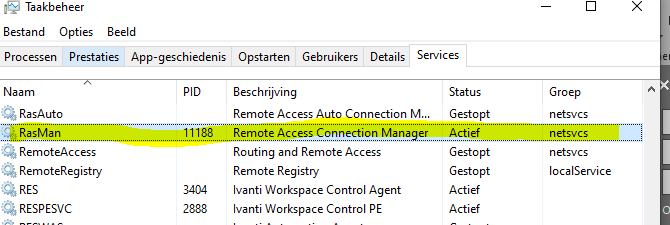
See the following link for the default service status: revertservice.com/10/rasman
As you can see the service should be set to Automatic, but for some reason it was set to Manual, most likely by an optimization script such as Citrix Optimizer.
After starting the service the icon went back to normal. Sometimes the solution is so easy you might forget it.