
Dit artikel is in het Engels geschreven. Hulp nodig bij dit onderwerp? Neem contact op.
Are you also tired of having to manually look up the App ID and the certificate thumbprint?
With this script these issues are gone! It assumes you have a new computer certificate installed on the machine, and you can simply run this PowerShell script on a Delivery Controller.
This certificate is needed for secure connections between StoreFront and ADCs. Do keep in mind that these certificates expire…
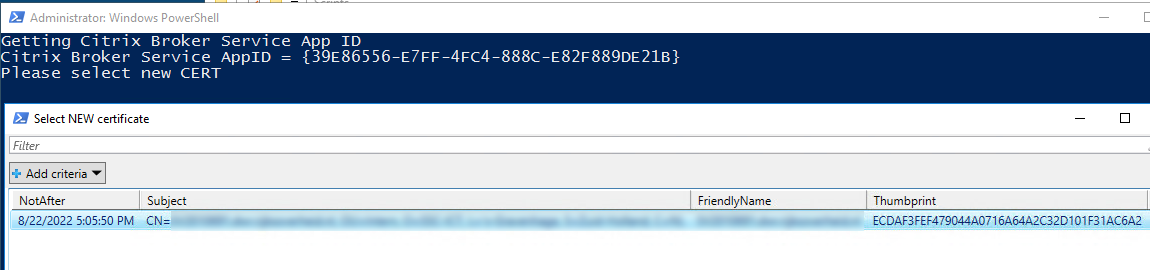
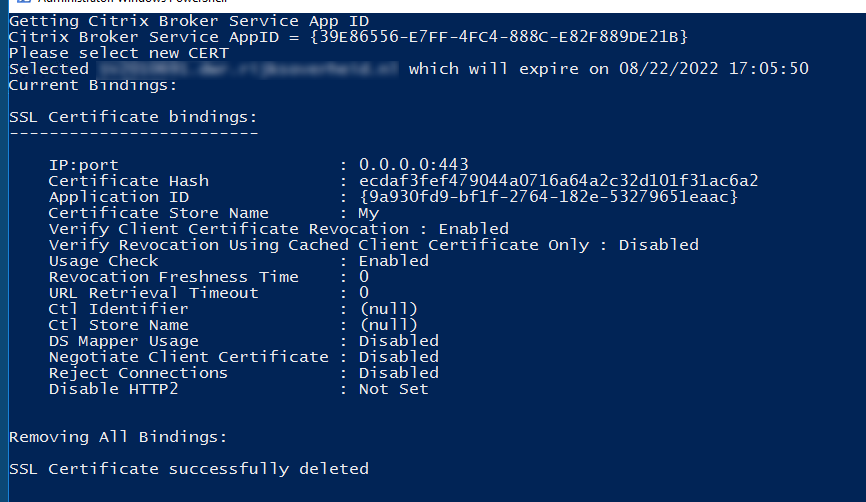
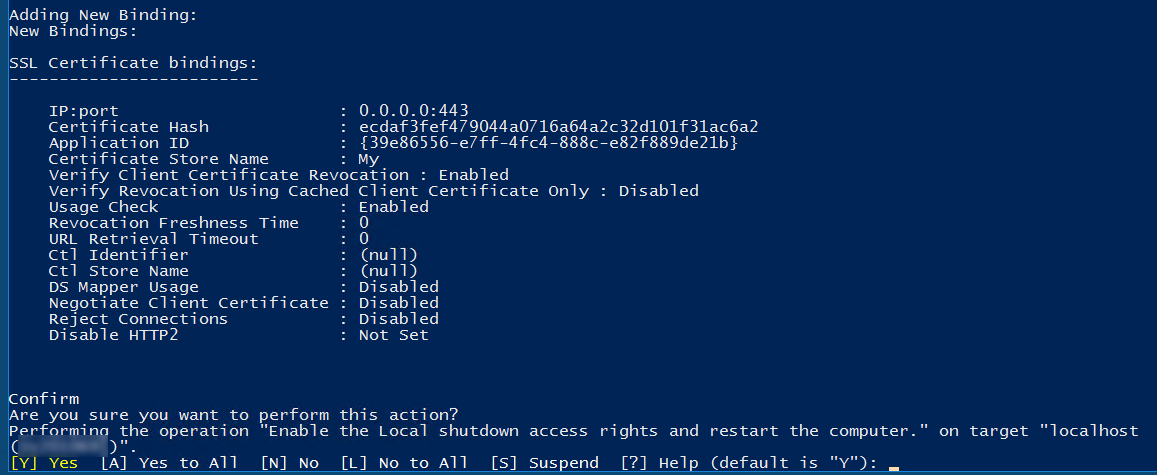
See the screenshots and script below:
##########################################################
#
#  Name      : Replace Computer Certificate Citrix Delivery Controller.
#  Created By: Silas Arentsen
#  Purpose   : Checks registery for Citrix Broker Service APPID, Prompts for the new Computer Certificate and will remove all current bindings and add new binding and ask to reboot local machine
#  Usage     : Run script on Delivery Controller as Admin.
#  Version   : 1.1
#  ChangeLog :
#  18-05-2020: Initial Release
#  30-03-2021: Fixed exiting the Cert popup
#  01-03-2025 : Added NETSH for adding cert as powershell somtimes errors out
#
##########################################################
if (!([Security.Principal.WindowsPrincipal][Security.Principal.WindowsIdentity]::GetCurrent()).IsInRole([Security.Principal.WindowsBuiltInRole] "Administrator")) { Start-Process powershell.exe "-NoProfile -ExecutionPolicy Bypass -File `"$PSCommandPath`"" -Verb RunAs; exit }

Write-Host "Getting Citrix Broker Service App ID"
$appID = Get-ChildItem HKLM:\software\Classes\Installer\Products | Get-ItemProperty | where {$_.ProductName -match "Citrix Broker Service"} | foreach {$_.PSPath.ToString().Split("\")[6]}
if ($appID) {
$appID = $appID.Insert(20,"-")
$appID = $appID.Insert(16,"-")
$appID = $appID.Insert(12,"-")
$appID = $appID.Insert(8,"-")
$appID = "{$appID}"
} else {Write-Host "Error: Unable to find Citrix Broker Service"

break
}

Write-Host "Citrix Broker Service AppID = $appID"
Start-Sleep 3

Write-Host "Please select new CERT"
Set-Location Cert:\LocalMachine\My
$Cert = Get-ChildItem | Select NotAfter, Subject, FriendlyName, Thumbprint | Out-GridView -Title "Select NEW certificate" -OutputMode Single
If(!($Cert)){Write-Host "No certificate chosen, please run script again! Exit in 10 seconds...";start-sleep -seconds 10; Exit}
Write-Host "Selected $($Cert.FriendlyName) which will expire on $($Cert.NotAfter)"
Start-Sleep 3

Write-Host "Current Bindings:"
netsh http show sslcert
Start-Sleep 3

Write-Host "Removing All Bindings:"
netsh http delete sslcert ipport=0.0.0.0:443
$LocalIP = Get-NetIPAddress | Where {$_.IPAddress -NotLike "*fe80*" -and $_.IPAddress -NotLike "*127*" -and $_.IPAddress -NotLike "*::1*"}

$NewLocalIP = ($LocalIP.IPAddress) + (":443")

netsh http delete sslcert ipport=$NewLocalIP

Start-Sleep 3

Write-Host "Adding New Binding:"
Add-NetIPHttpsCertBinding -IpPort "0.0.0.0:443" -CertificateHash $Cert.Thumbprint -CertificateStoreName "My" -ApplicationId $appID -NullEncryption $false
netsh http add sslcert ipport=0.0.0.0:443 certhash="$($Cert.Thumbprint)" appid="$($appID)"
Start-Sleep 3

Write-Host "New Bindings:"
netsh http show sslcert
Start-Sleep 3

Restart-Computer -Confirm